AirCloud June 2026 Update

AirCloud got a major update in June 2026.
This release focused on improving the experience for every team — whether you're just getting started with AirCloud or running multiple projects every day. We redesigned the console, introduced real-time notifications, and expanded persistent volume support to cover more deployment environments. The goal was to make the platform feel faster and more intuitive at every step.
For detailed usage guides, visit AirCloud Docs. This post covers the key changes from the June update 😊
1. A Faster, More Intuitive Console
This update focused on reducing the number of clicks it takes to get things done. We reworked the most frequently used screens to make navigation clearer and actions more direct.
Container Creation Is Now Simpler
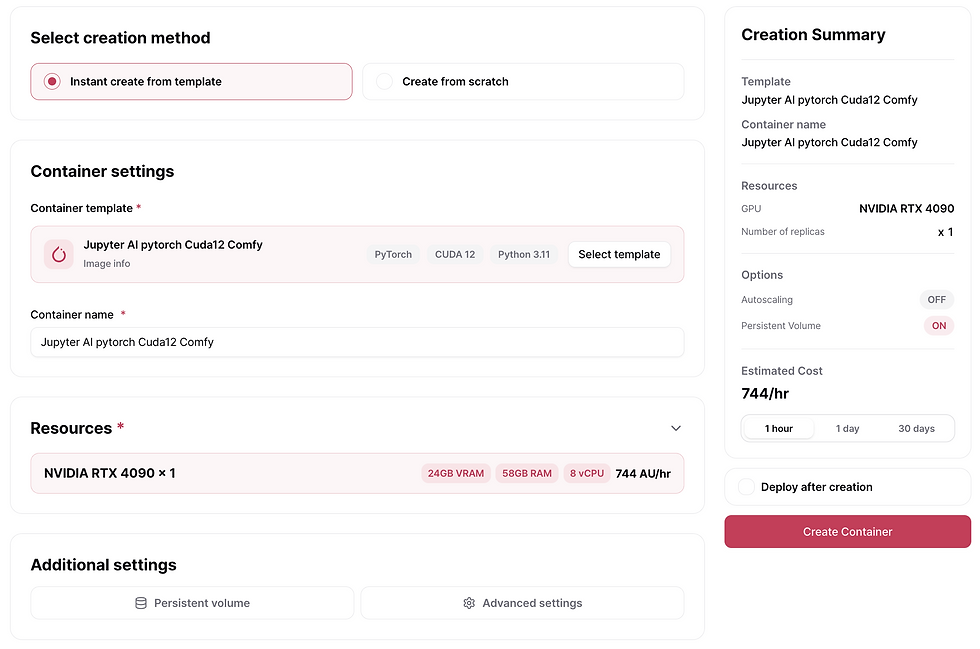
Instant creation with a template
Previously, template-based deployments and custom image deployments shared the same creation flow. Even when using a template — where most settings are already configured — users still had to scroll through every step and click "Next" repeatedly, just like a manual setup.
We've now split the two flows entirely. When you select a template, your container is created immediately with no additional configuration required. It's the fastest way to get started.
Create from scratch
When you need full control over your environment, the from-scratch flow has been redesigned with a tabbed layout. You can move freely between configuration steps and make edits without losing your progress. A Summary Card on the right side shows your estimated cost in real time based on your current settings — so you can optimize resource usage as you configure.

When starting a deployment, you can also check your replica quota before launch. If the quota is insufficient, you can adjust the count or submit a quota increase request right away — no more getting blocked at the last step.
Easier Management with Tags
As a project grows, so does the number of containers. You can now create custom tags and assign them to containers, then filter and search by tag. It's especially useful when managing containers across multiple services or environments.

A More Intuitive Layout
The project overview screen — the first thing you see after logging in — has been redesigned. You can now see the following at a glance:
Recently run containers
Recommended templates to get started quickly
Today's Air API usage summary
No more navigating across multiple screens just to understand your project's current state.

Air API Playground Improvements
The Air API Playground has also been updated:
A dropdown button makes it easier to switch between model Playgrounds
Playground and README are now separated into tabs for smoother switching between testing and reading documentation
Pricing information is now displayed directly in the Playground

General Console Improvements
A few smaller changes that add up over time:
Select which replica to connect to in the Web Terminal; if the replica is replaced, the terminal reconnects automatically
Activate or deactivate SSH keys per container, without deleting them
List screen state (search, filters, sorting, pagination) is now saved in the URL, so the back button restores exactly where you were
2. Real-Time Notifications
In production, the most important thing is not missing what matters. This update adds real-time notifications so you can catch important events without manually refreshing the page.
Console Notifications

Deployment completions, failures, status changes, and announcements now appear in the console in real time. Even while working on something else, you won't miss a critical change. A notification detail page is available so you can catch up on anything you missed.
Desktop Notifications
You no longer need to keep the console tab open to stay informed. Enable browser notification permissions and you'll receive desktop alerts for key events such as:
Deployment complete
Low balance
Service status changes
This keeps you informed without switching tabs. For setup instructions, see the Desktop Notifications guide in AirCloud Docs.
Balance and Usage Alerts

Unexpected service interruptions from billing issues can be costly. You can now receive email notifications for:
Low account balance
GPU usage charges
Payment failures
Getting notified early gives you time to respond before services are interrupted.
3. Persistent Volumes
Persistent volume support has been expanded to cover more deployment scenarios.

Volumes in Autoscaling Environments
You can now attach volumes to deployments that use autoscaling and multiple replicas. When scaling up, there's no need to reconfigure your volume setup from scratch.
Select a Volume at Creation Time
When creating a deployment, you can either create a new volume or connect an existing one. Volumes with existing data can be attached to a new deployment and used immediately — no re-upload needed.
Share Across Multiple Deployments
A single volume can be connected to multiple deployments. When selecting a volume, you'll see which deployments are already using it, making it easy to understand your volume relationships at a glance.
4. Other Updates
We've also updated the official documentation this month. Key feature explanations have been expanded, and onboarding content has been added to help new users get started more quickly.
The sign-up flow has also been simplified. Verification codes can now be entered directly on the sign-up screen, and disposable email domains are blocked at registration.
Wrapping Up
The June update was less about adding features and more about making the platform feel better to use every day. Container creation is simpler, the console is more intuitive, real-time notifications keep you informed without extra effort, and persistent volumes now support a wider range of deployment setups.
We'll keep improving AirCloud so developers and teams can work with GPU cloud infrastructure more easily and efficiently. Try the update now 🤗
Related Links